



Why Does Spotify Ask for Email Verification When Logging In? Causes & How to Avoid It
1. Why Does Spotify Ask for Email Verification?
When logging into Spotify, you may occasionally see a request to verify your account using a code sent to your registered email address.
This is part of Spotify's account security system, designed to protect users against unauthorized access and suspicious login activity.
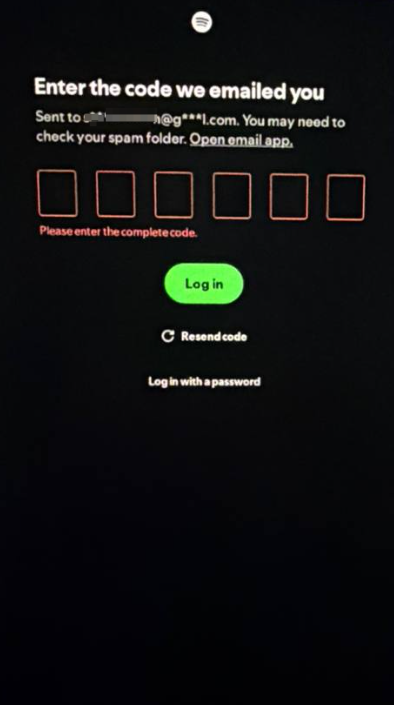
Several factors may trigger additional verification:
1. Unfamiliar IP Addresses or Locations
Logging in from a new IP address, a different country, or an unusual network environment may cause Spotify to request additional verification.
2. VPN or Proxy Connections
VPNs and proxy servers can change your apparent IP address and location. Some connections may also be flagged by Spotify's security systems.
3. Frequent IP or Network Changes
Frequently switching between different IP addresses or network locations may make login activity appear unusual.
4. New Devices or Unfamiliar Login Environments
Logging in from a new device, browser, or environment may trigger additional security checks.
5. Too Many Login Attempts
Repeated login attempts within a short period may activate Spotify's security protection and temporarily restrict access.
2. How to Reduce Spotify Email Verification Requests
Although no method can guarantee that Spotify will never request verification, the following practices can help reduce unnecessary security checks.
1. Use a Stable and Reliable Network
Avoid frequently changing your IP address or switching between different network locations. Use a consistent, trusted internet connection whenever possible.
2. Avoid Unreliable VPNs and Proxies
Avoid low-quality, unstable, or frequently changing proxy connections. If Spotify displays a security restriction related to a VPN or proxy, follow Spotify's recommendation to disable it.
3. Avoid Repeated Login Attempts
If Spotify requests verification or temporarily blocks a login attempt, avoid repeatedly trying to log in. Wait before trying again. Spotify recommends waiting 24 hours when certain request limits are reached.
4. Keep Your Device and Software Updated
Use updated applications, operating systems, and security software to maintain a reliable login environment.
5. Keep Access to Your Registered Email
This is particularly important. Always make sure you can access the email address associated with your Spotify account.
If Spotify requests a verification code, you need access to that email to complete the security check. An email address that you cannot access may prevent you from logging in successfully.
3. What Should You Do If Spotify Still Requests Verification?
If Spotify continues requesting email verification:
Check your internet connection and IP environment.
Stop repeated login attempts and allow time for security restrictions to reset.
Check your registered email inbox and spam folder.
Complete the verification through Spotify's official login process.
Contact Spotify Support if you no longer have access to your registered email.
Remember that email verification is a Spotify security requirement, not necessarily a software malfunction.
4. Final Thoughts
Spotify email verification is designed to protect accounts from suspicious or unauthorized access.
Using a stable network, avoiding frequent IP changes, and maintaining access to your registered email can help make the login process more consistent.
The most important advice: Always keep your Spotify account information and registered email accessible. This will help you avoid unnecessary login interruptions and resolve security checks more easily.