



Spotify Premium Payment Failed: Causes and Solutions in 2026
Trying to upgrade a Spotify account to Premium but receiving the message “The payment failed. Please try again, use a different payment card or a different payment method”?
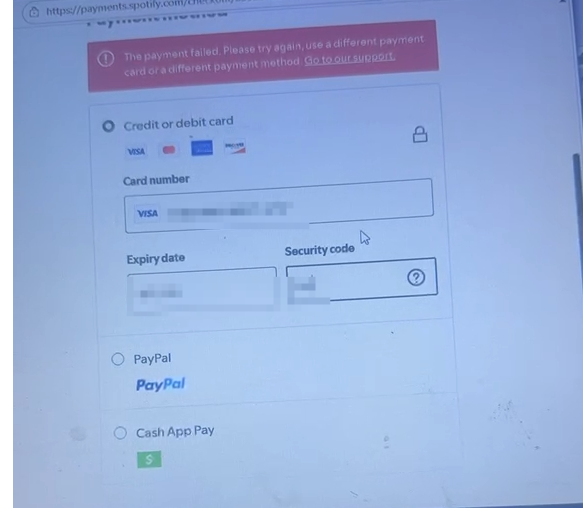
This error can be frustrating because Spotify does not always explain the exact reason why a payment was rejected. In many cases, the card itself is valid and has sufficient funds, but the payment fails because of a mismatch between the Spotify account, payment method, location, or payment settings.
This guide explains the most common causes of Spotify Premium payment failures and provides practical solutions, including what to check when using a browser automation tool.
Why Does Spotify Premium Payment Fail?
There are several possible reasons for a failed Spotify Premium payment.
The most common ones are:
The payment card is registered in a different country from the Spotify account.
Online or international transactions are disabled.
Recurring subscription payments are not supported.
Billing information does not match the card issuer's records.
The bank requires additional authentication.
The account's country or region is incorrect.
Spotify temporarily rejects the payment attempt.
The payment method is not supported in the selected market.
Spotify itself recommends checking these factors when a payment fails.
Let's look at each issue in detail.
1. Check the Spotify Account Country
One of the first things to check is the country or region associated with the Spotify account.
Spotify determines the account's country or region based on where the account was registered. If the account is being used in another country, Spotify may require the account's country/region settings and payment method to correspond to that location.
For example, if the account is configured for the United States but the payment method was issued in another country, the transaction may be rejected.
What to check
Before attempting the payment, verify:
Spotify Account Country → Payment Method Country → Current Connection Location
These should be logically consistent.
If you are legitimately using a U.S. account, for example, use a payment method supported for the U.S. market rather than mixing payment information from unrelated regions.
Spotify also notes that payment methods available to users can vary by country or region.
2. Make Sure the Card Supports Online and Recurring Payments
A credit or debit card can work perfectly for normal purchases but still fail when used for a subscription.
Spotify specifically recommends checking whether the payment method supports:
Online transactions
International transactions
Recurring payments
Sufficient available funds
These settings are often controlled by the card issuer or bank.
If your bank provides a mobile application, check the card settings and make sure online and recurring payments are enabled.
If everything looks correct but the payment still fails, contact the card issuer and ask whether the transaction was declined.
3. Check Your Billing Information
Another common problem is incorrect payment information.
Make sure the information entered during checkout is consistent with the information associated with the payment method.
Pay particular attention to:
Cardholder name
Billing address
Postal or ZIP code
Country
Card number
Expiration date
Security code
A small inconsistency can sometimes cause a payment authorization to fail.
Do not simply change the billing country to make a payment go through. The billing information should represent the legitimate information associated with the payment method.
4. Complete Any Required Bank Verification
Some transactions require additional verification from the bank or payment provider.
Depending on the card issuer, this could involve:
A verification code
Banking app approval
PIN authentication
Biometric verification
3-D Secure authentication
Spotify notes that the bank or payment provider may need to verify your identity for security reasons.
If your browser or automation environment prevents the verification step from appearing or completing correctly, the payment may fail even though the card is valid.
5. Make Sure Your Automation Environment Matches the Account Region
If you are using an automation tool or browser software to manage Spotify accounts, the software itself does not necessarily cause the payment failure.
However, inconsistent browser environment settings can contribute to payment verification problems.
For example, avoid creating an environment where:
The account is configured for one country.
The network connection appears to come from another country.
The browser timezone indicates a third country.
The browser language strongly conflicts with the account environment.
Payment information belongs to another market.
Recommended software configuration
When using browser automation for legitimate account management, keep the environment consistent with the account's actual region.
For example:
Account Country: United States
Network Location: United States
Browser Time Zone: Consistent with the selected region
Browser Language: Consistent with the selected region
Payment Method: Supported in the same market
The goal is not to manipulate Spotify's payment system. The goal is simply to avoid unnecessary inconsistencies that can interfere with normal payment verification.
6. Use a Stable Network Connection
Payment pages sometimes involve several redirects and security checks.
A temporary network problem can interrupt the payment process.
Spotify recommends waiting a few hours and trying again if the problem may be temporary.
When using browser automation software, make sure the connection is:
Stable
Not constantly changing during checkout
Consistent with the account's legitimate location
Able to load Spotify's payment and verification pages normally
Avoid repeatedly switching network locations during a single payment session.
7. Don't Repeatedly Submit the Same Failed Payment
If the first payment attempt fails, repeatedly clicking the payment button is usually not a good troubleshooting strategy.
Instead:
Stop the current payment attempt.
Check the account country.
Verify the card settings.
Confirm the billing information.
Check whether bank verification is required.
Wait for a temporary payment issue to clear.
Try again later.
Spotify itself recommends trying again after a few hours if the problem may be temporary.
8. Try a Different Supported Payment Method
If all account and card information is correct but the payment continues to fail, try another payment method that is officially available in your region.
Spotify states that available payment options vary by country or region.
For this reason, there is no single payment method that works for every Spotify market.
The best approach is to check the payment options presented by Spotify for the account's actual country and select one that is supported there.
9. What If the Card Works Elsewhere but Not on Spotify?
This is an important distinction.
If the card works normally for other online purchases but fails specifically on Spotify, the problem may not be insufficient funds or a damaged card.
Possible causes include:
Subscription/recurring payment restrictions
International transaction restrictions
Country mismatch
Payment verification failure
Temporary authorization rejection
Payment method compatibility
Account-specific payment restrictions
In this situation, contact the card issuer and ask whether they can see a declined Spotify transaction.
The bank may be able to provide more specific information than the generic error shown by Spotify.
A Simple Spotify Payment Troubleshooting Checklist
Before trying again, go through this checklist:
Account
Spotify account country is correct
Premium plan is available in that market
Account information is complete
Payment Card
Card is active
Card has sufficient funds
Card has not expired
Online transactions are enabled
International transactions are enabled if required
Recurring/subscription payments are supported
Billing Information
Cardholder information is correct
Billing address is correct
Postal/ZIP code is correct
Payment country is consistent with the payment method
Browser / Software
Stable network connection
Account region and connection location are consistent
Browser timezone is configured consistently
Browser language is reasonable for the selected region
Payment verification pages can load normally
No payment verification step is being blocked
Troubleshooting
Don't repeatedly submit failed payments
Wait a few hours before trying again
Try a supported alternative payment method
Contact the payment provider if necessary
Final Thoughts
The “The payment failed” message does not necessarily mean that your credit card is invalid.
In many cases, the underlying issue is related to country compatibility, recurring payment permissions, billing information, bank verification, or a temporary payment authorization problem.
If you are using automation software, the best approach is to keep the browser environment consistent with the account's legitimate region rather than assuming that the software itself is responsible for the failed transaction.
Start with the account country and payment method, then check the card's online and recurring-payment permissions. After that, verify the billing information and make sure any bank authentication can be completed normally.
If the problem continues after these checks, trying another officially supported payment method or contacting the payment provider is usually the next step.
In short: keep the account, network environment, billing information, and payment method consistent—and give Spotify's payment system a little time if a temporary authorization problem occurs.
Frequently Asked Questions
Why does Spotify say “The payment failed”?
Spotify may reject a payment for several reasons, including an unsupported payment method, incorrect billing information, insufficient funds, country or region inconsistencies, disabled online or recurring payments, or a failed payment verification. A temporary authorization problem can also cause the same message.
Why is my card not working for Spotify Premium?
Your card may work for other purchases but still be rejected by Spotify if it does not support recurring subscription payments, online transactions, or international transactions. Check your card settings with your bank and make sure the billing information is correct.
Does the Spotify account country affect payment?
Yes. Spotify's available payment methods and Premium plans can vary by country or region. The account's country should be consistent with the legitimate location and payment method being used.
Can I use a credit card from another country for Spotify Premium?
Payment options and requirements vary by market. A card issued in a different country may not be accepted for a particular Spotify market. If the payment fails, check whether the card is supported for the account's selected country and contact the card issuer if necessary.
Why does Spotify payment fail even though my card has enough money?
Having sufficient funds does not guarantee that a subscription payment will be approved. The card may have online, international, recurring-payment, or verification restrictions. The bank may also decline the transaction for security reasons.
Can browser settings cause Spotify payment problems?
Browser settings do not necessarily cause a payment failure, but an inconsistent browsing environment can interfere with payment verification. When using account management software, keep the network location, account region, browser timezone, and language settings reasonably consistent with the account's legitimate region.
What should I configure in automation software before making a Spotify payment?
Use a stable network connection and make sure the browser environment is consistent with the account's legitimate country or region. Avoid changing network locations during checkout, and make sure Spotify's payment and bank verification pages can load normally.
Should I keep trying if Spotify rejects my payment?
It is better not to repeatedly submit the same failed payment. Check the account country, card settings, billing information, and verification requirements first. If the problem appears temporary, wait a few hours and try again.
What should I do if Spotify Premium payment still fails?
First, verify the account country and payment method, then check your card's online and recurring-payment settings. Make sure your billing information is accurate and that any required bank authentication can be completed. If the problem continues, try another officially supported payment method or contact your card issuer.
Is Spotify payment failure always caused by the software?
No. A payment failure can occur even when using Spotify directly in a normal browser. Country settings, payment-card restrictions, billing information, bank verification, and temporary authorization issues are all possible causes. If a payment works in a normal browser but fails in an automated environment, then the browser or environment configuration should be investigated separately.