



How to Create Multiple Free and Premium Spotify Accounts for Music Promotion: Complete AIOStream Guide
- In today’s competitive music industry, getting your tracks discovered on platforms like Spotify requires more than just uploading great music. Independent artists, music promoters, and marketing teams need efficient ways to manage their promotional strategies, analyze audience engagement, and build scalable workflows.
One of the biggest challenges many music marketers face is managing multiple Spotify accounts for different promotional activities. Creating accounts manually can be time-consuming, repetitive, and difficult to scale, especially when managing campaigns across multiple artists, playlists, or marketing projects.
This is where automation tools can make a significant difference.
AIOStream is designed to help music professionals simplify Spotify account management by providing an efficient solution for creating and organizing multiple Spotify accounts. Whether you need to manage free accounts or premium accounts, AIOStream helps streamline repetitive tasks and allows users to focus more on music promotion strategies rather than spending hours on manual account setup.
In this guide, we will walk you through how to create multiple Spotify accounts, explain the differences between free and premium accounts, and show how AIOStream can help optimize your Spotify workflow.
- 1. Add an account category
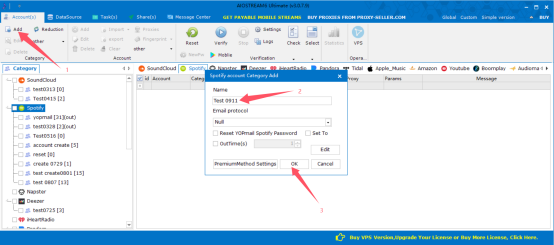
- 2. Follow above tip to import info
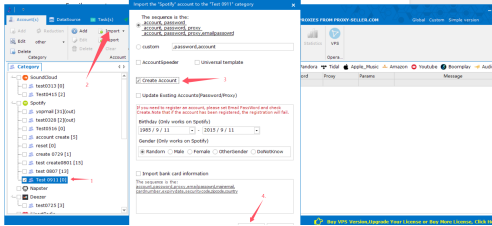
The format of the imported account info should be:

You can prepare the info in txt. Or in CSV.
Notice: it doesn’t allow excel for now.
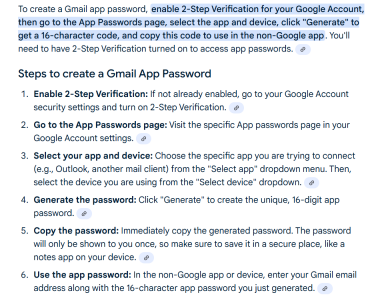
Note: if you are going to use gmail accounts to register, make sure you have enable IMAP/POP of the gmail accounts, and also fill in APP Password as “Email Password”.
- A. Turn on pop/imap:
https://www.youtube.com/watch?v=ERMJ56i-p2s
- B. Enable app password
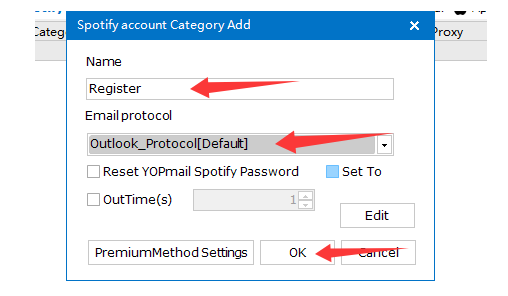
Note : if you want to use outlook accounts to create music sites accounts,
 Register Premium Accounts (Spotify, Tidal, Apple etc.)- import account format sample:
account,password,proxy,emailpassowrd,mainemail,cardnumber,expirydate,securitycode,zipcode,county,street,city,state

For example, if using outlook email address to create premium accounts. This is one sample:
[email protected],ynwc7141AB!@,127.0.0.1:5000:username:password,dbc8e03a-b00c-46bd-ae65-b683e7707cb0|M.C554_SN1.0.U.-ChNNF7UBfW8o4HhJPqu7rSsmy03ovrAlONM8OQl09i7mK5Jz64WrcQK7kgmnyzUcWHhQTSxIMY*Ot9bd4mc91qGQMdcDOD1XvEHyYEAte!8*EhnsMX4CIF3wOdMR5kxaBEgY6eWu0ccClyXh3pDXXd5JSoU8mQSOE3D06qDcPZTGsGxLfe8HCjuTYYXGkC2YFVCukXP7pJTTMQEVNYRLr2N*zBOnAV5t7gQ0NuIT!YVS6PkFSakpNZklis2wXlW!s*B3qsES2j6Q7fJyyhdgyOV86TeJoy!Pv9o651fso*itDOZwM02Hq9dYvt8FHACDvOQSwGjfJshA0*IjwIvJ3pfYIJcCw62j37hv1DMYXgJuHMnHcfVonFa!95TVMB58YQ$$,[email protected],4367114519000000,0826,114,91755,France,,,
- 3. After imported all the info, then please select all the accounts and make sure it to be blue color.
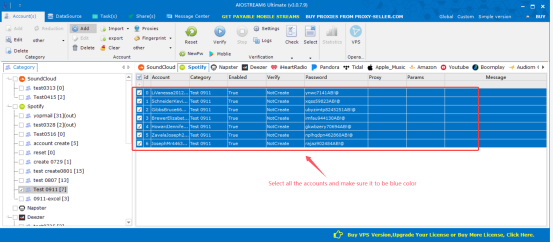
- 4. Tick proxies option and bind proxies with per account
You can refer to this video>>
https://www.youtube.com/watch?v=lpcPu3GaOeI
Or follow below steps:
1).Tick proxies option like below
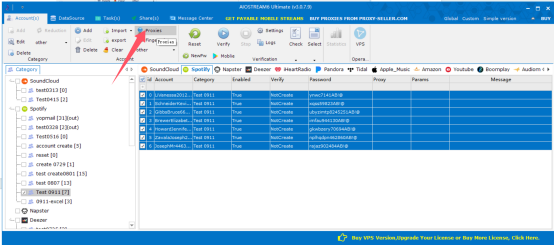
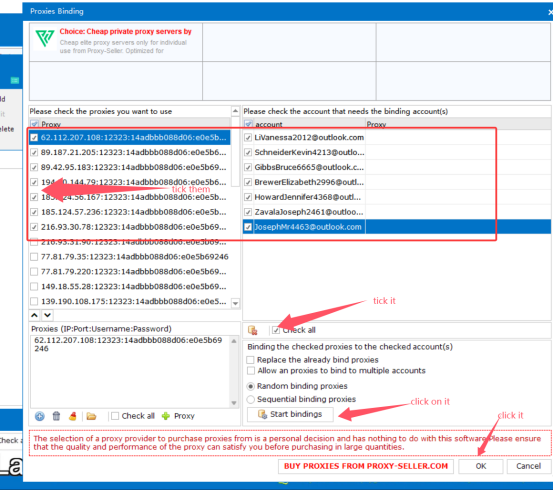
2).Bind proxies
If you don’t have proxies here, click “add proxies”button to add more
Then you can see the proxies bound successfully
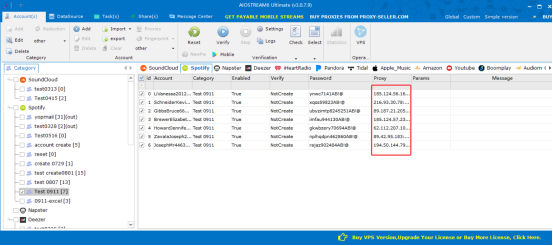
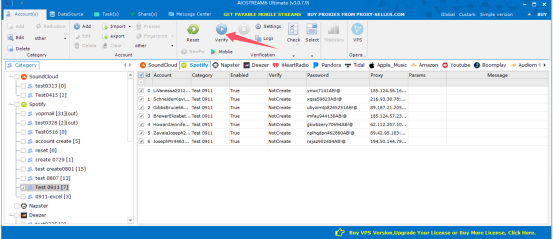
- 5. Tick on verify button to create accounts
Building a successful Spotify promotion strategy requires the right combination of quality music, effective marketing, and efficient account management. As your campaigns grow, manually handling multiple accounts can become increasingly difficult and time-consuming.
By using automation solutions like AIOStream, music marketers, independent artists, and promotion teams can simplify account management, improve workflow efficiency, and spend more time focusing on creative strategies and audience growth.
Whether you are promoting your own music, managing multiple artists, or running professional music marketing campaigns, having the right tools can help you work smarter and scale your efforts more effectively.
If you want to explore a more efficient way to manage your Spotify account workflow, try AIOStream today and discover how automation can help support your music promotion journey.
For more information, visit www.aiostream.com or contact our team:
Telegram: @aiostream
WhatsApp: +8619302312554